Intro
I’ve always been fascinated by Conspiracy’s Emerald Box ever since it was released…in 2004! 20+ years later I decided to port it to the web so that it’s easily accessible by me (and anybody who ever cares) instead of relying on static YouTube recordings which take away the magic this very cute musicdisk brings.
Since it’s a demo, it’s closed source so I had to reverse engineer it to extract its assets and then reimplement the playback of tracker files. Nothing was patched, nothing was re-drawn – all the assets were extracted from the original packed exe from 2024. The result live here, and since zoom is cool with it (thank you!), I am posting it!
Below is a somewhat deep writeup of the rever-engineering process, which includes an easter egg too.
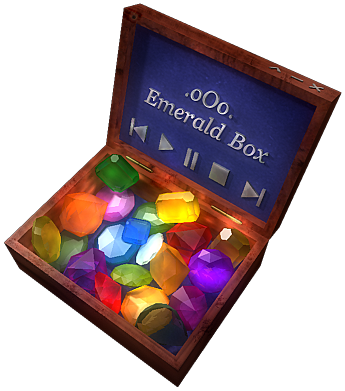
A technical write-up of the work done to (1) statically and dynamically analyse
emerald_box.exe, a 2004 demoscene musicdisk by Conspiracy, (2) extract every
graphical resource the original uses, (3) reconstruct its interactive layout
from first principles, and (4) re-implement the whole thing as a zero-build,
zero-dependency-at-runtime web application that drives the 20 (21) shipped tracker
modules through a WebAssembly build of libopenmpt.
Nothing in the binary was patched. No artwork was redrawn. The end result is a pixel-for-pixel reconstruction where every visible pixel originates from the original exe.
1. Starting point
The input was a 994 816-byte Win32 PE32 executable, together with 20 tracker
modules already extracted out of the running executable via
the (then-documented) emerald_box.exe -rip command line switch. Those 20
files are .it and .mod modules and live under tracks/ in the repo.
$ file emerald_box.exe
emerald_box.exe: PE32 executable for MS Windows 4.00 (GUI), Intel i386,
                 UPX compressed, 3 sections
The usable target was therefore the binary’s graphical resources, its layout, and its runtime behaviour. Nothing about the audio pipeline needed to be replicated – once the trackers are available, playback is a solved problem.
2. Static and dynamic analysis
2.1 UPX unpacking
The packed binary has three sections (UPX0, UPX1, .rsrc), typical of a
UPX-compressed Windows binary with a tiny stub resource table. Unpacking
exposes the real resource directory:
$ upx -d -o emerald_box.unpacked.exe emerald_box.exe
2.2 Section layout
Post-unpack, a standard Python PE header walker shows:
emerald_box.exe sections:
  UPX0      virt= 1650688  raw=       0
  UPX1      virt=  987136  raw=  986624
  .rsrc     virt=    8192  raw=    7168

emerald_box.unpacked.exe sections:
  .text     virt=   15324  raw=   16384
  .rdata    virt=    2386  raw=    4096
  .data     virt=  183452  raw=  167936
  .rsrc     virt= 2390976  raw= 2392064
The unpacked .rsrc is ~2.3 MiB. That is where the graphics live; we never
needed to read a single byte of .text or .data past this point.
2.3 PE resource enumeration
wrestool (from icoutils) lists Windows RT_BITMAP, RT_ICON and custom
resource entries. Every bitmap was dumped to disk:
$ wrestool -l emerald_box.unpacked.exe | head
--type=2 --name=102 --language=1038 [type=bitmap offset=0x1a90 size=480054]
--type=2 --name=103 --language=1038 [type=bitmap offset=0x76dc6 size=5750]
--type=2 --name=107 --language=1038 [type=bitmap offset=0x78440 size=354796]
...
58 bitmap resources were recovered in total. wrestool prepends the
14-byte BITMAPFILEHEADER automatically, so the .dib files it writes can
be fed directly into ImageMagick’s convert without any custom header
patching:
$ for dib in rsrc/raw/b*.dib; do convert "$dib" "rsrc/png/$(basename "$dib" .dib).png"; done
The full list of extracted bitmaps, with their dimensions and colour depth, is the starting inventory for classification:
b102.png   400x400  RGB     -- base image
b111.png   400x400  P       -- hitmap (30 unique grayscale values)
b112–b131  180x107  P       -- 20 pre-rendered track-title labels
b132       180x107  1-bit   -- lid trapezoid mask
b133       180x107  P       -- hidden-track label
b134–b153  variable RGB     -- 20 gem highlight sprites
b154       30x28    RGB     -- "star" / sparkle decoration
b155–b167  variable RGB/1b  -- transport button sprites + masks
2.4 Reference capture under Wine
With the unpacked exe alone one cannot tell where each bitmap is drawn,
which gem maps to which track, or what the .rsrc “corner” decorations
are for. Those answers come from observing the running program.
Wine was used as the runtime; xdotool managed the Wine window (the original
dialog-mode binary does not cooperate with wmctrl); ImageMagick’s import
tool captured screenshots; ffmpeg recorded a short video of the interactive
behaviour:
# Launch and locate the window
$ wine emerald_box.exe &
$ WID=$(xdotool search --name 'Emerald Box' | head -1)

# Screenshot
$ xdotool windowactivate "$WID"
$ import -window "$WID" ref/shot_001.png

# Video
$ ffmpeg -f x11grab -framerate 30 -video_size 400x400 \
         -i :0.0+${X},${Y} -t 8 ref/ebox.mp4
The reference material – 57 screenshots plus a short video – was stored in
ref/:
ref/ebox.mp4– 8-second capture of the default idle loopref/shot_*.png– snapshots of various UI statesref/key_*.png– snapshots taken after sending specific keystrokesref/hidden_*.png– snapshots taken after trying suspected hidden-part click coordinates (originating from strings in.rdata)ref/map/– 88 screenshots captured by programmatically clicking a dense grid across the chest; used for the hitmap→track calibrationref/uniq/– the 19 deduplicated states found inref/map/ref/mapped/– 19 rerun screenshots, each captured by clicking the median interior pixel of each hitmap region (see §3.5)
3. Asset identification and classification
Bitmaps were classified by matching their pixel content against the reference screenshots, supplemented by image-shape statistics (dimension, colour count, entropy) where matching was ambiguous.
3.1 The 400x400 base image and hitmap pair
Two resources share the 400×400 frame size: b102 and b111.
b102.png(RGB, 256 distinct greys) is pixel-identical to every idle screenshot inref/modulo the selected gem and the lid label. It is the “base” image.b111.png(palette mode, 30 distinct grey values, fully opaque) is clearly not a picture – it is a hitmap. Each non-zero pixel’s grey value encodes a region index.
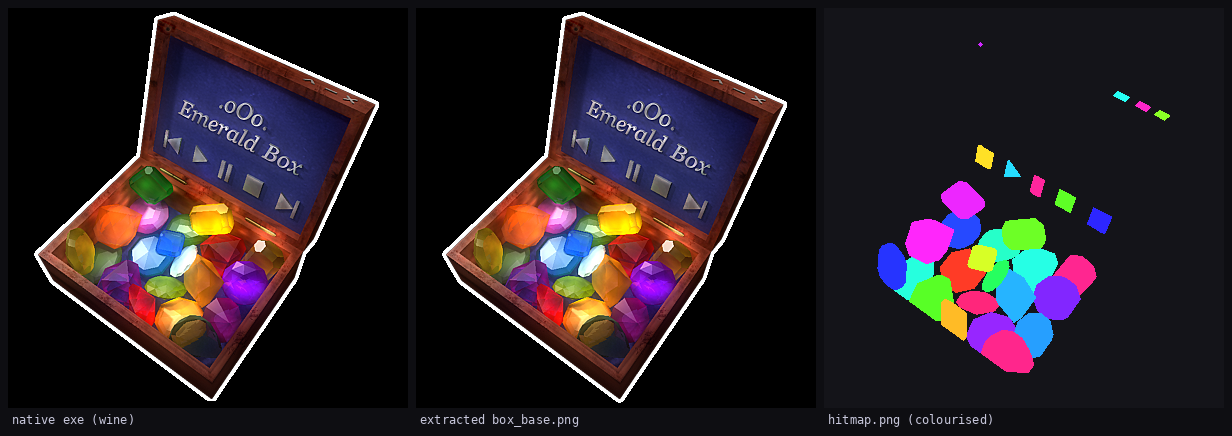
Left: a screenshot of the native executable running under Wine
(ref/shot_001.png). Centre: the single resource b102.png that the exe
blits onto its client area every frame – pixel-identical to the left side
minus the selected gem and lid label. Right: the same-sized b111.png
rendered with one hue per non-zero shade so the 29 regions are visible. In
the original file it is nearly black; nothing in it is intended to be
displayed.
Summarised as unique shades, sorted:
$ python3 -c "
from PIL import Image; import collections
print(sorted(set(Image.open('rsrc/png/b111.png').convert('L').getdata()) - {0}))
"
[10, 20, 30, 40, 51, 60, 70, 80, 90, 100, 110, 120, 130, 140, 150,
 170, 180, 190, 204,               # 19 gems
 222,                              # hidden-part "star"
 236, 237, 238, 239, 240,          # 5 transport buttons
 250, 251, 252]                    # 3 lid-corner decorations
This is the crucial discovery: the hitmap is consumed at runtime by sampling
hitmap[mouseY * W + mouseX], and the specific shade value dispatches to the
right behaviour. It collapses what would otherwise be 27 polygon-in-region
checks into a single pixel read and a hashmap lookup.
3.2 Track label bitmaps and the 1-bit lid mask
Twenty bitmaps in a row (b112..b131) are 180×107 palette images. Viewing
any of them shows the same blue lid trapezoid, with a single track’s title
drawn in white italics – e.g. “01. Eludom”, “02. Outsider”. They are
label_01.png through label_20.png.
b133 is the 21st label of the same shape – “\o/ Enigma” – which is the
hidden track.
b132 is a 1-bit mask of the trapezoid itself, stored with exactly two
colours in the palette (label_mask.png). Its histogram confirms the format:
$ identify -verbose assets/label_mask.png | grep -A3 Histogram
  Histogram:
          9408: (0,0,0) #000000 gray(0)
          9852: (255,255,255) #FFFFFF gray(255)
The labels are intended to be blit onto the base at a fixed (x, y) and clipped
to the trapezoid defined by the mask. The exact paste position was determined
by diffing label_01.png against the central lid rectangle of box_base.png
and locating the unique translation that produces the minimum pixel error:
(149, 81).
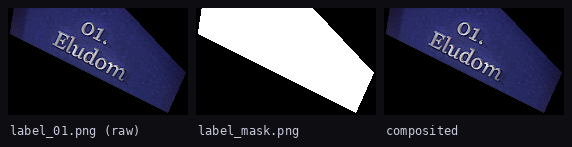
Left: the raw label_01.png as shipped in the PE resources – a 180×107
rectangle with a black border that would otherwise paint a black rectangle
over the lid. Centre: the 1-bit trapezoid mask label_mask.png. Right:
the final per-frame composite used at runtime: the mask is applied as a
destination-in alpha channel so only the italicised title shows through the
lid’s existing artwork.
3.3 Gem highlight sprites – constrained template matching
Bitmaps b134..b153 are small (30×30 to 60×60) RGB sprites, each showing a
single gem in a “lit” state – more saturated, with specular highlights added.
They are the highlight state that the original app paints on top of the
base when a gem is clicked.
Their drawing positions are not stored in the resource directory. They had to
be recovered by template matching the sprite against the base image.
A first naïve cross-correlation failed (all scores negative) because int16
summation overflowed on the 400×400 base. The second iteration used
float32 and was correct but visually wrong: several gems matched a similar
gem’s location instead of their own.
The fix was to constrain the search to a small neighbourhood of each
hitmap region’s centroid before running the correlation. That is, for each
of the 19 gem shades S found in b111.png:
- Compute the centroid
(cx, cy)of all pixels in the hitmap with valueS. - Template-match every candidate gem sprite against
box_base.pnginside the window(cx ± 24, cy ± 24). - Greedy-assign: pick the sprite with the highest score in the window, remove it from the candidate pool, repeat.
The result is assets/sprites.json – 20 entries of
{hitmap_idx, sprite_src_bmp, sprite_xy, sprite_wh}, one per playable track
(1..20, including 16).
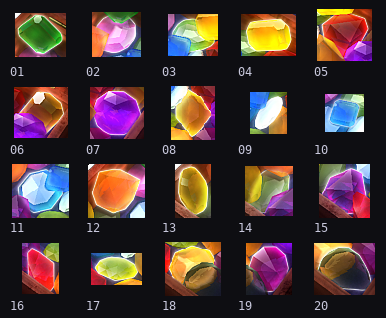
The 20 recovered highlight sprites, labelled by track number. They are
stored as opaque RGB rectangles (no alpha channel); the black background
inside each sprite is blended out at draw time by compositing with
globalCompositeOperation = 'lighten' against the already-lit base image.
See §6.4 for why that specific blend mode matters.
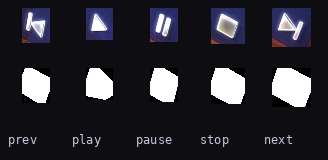
3.4 Transport buttons – sprite/mask pairs
Five small sprite/mask pairs were identified by dimension pattern: each
button’s RGB sprite (RGB, colour) is paired with a 1-bit mask
(mode=1, two greys, same dimensions). Pairing sprites with masks was
unambiguous – there were exactly five RGB + five 1-bit bitmaps between
b155 and b167, with one-to-one size matches.
Role assignment (prev/play/pause/stop/next) was done by looking at the
sprite content. Each sprite clearly shows the classic media-player glyph,
with the classic progressive sizes. The runtime binding table is
assets/buttons.json.
3.5 Hitmap shade → track number mapping
Knowing “gem shade 10” is a gem is not enough; we needed to know which gem. The straightforward approach – click every non-zero hitmap region at its centroid and read off the resulting lid label – was run twice.
The first pass overlapped several tracks because some centroids fell on anti-aliased hitmap edges, which the native app tested with a nearest-value comparator that we did not perfectly reproduce. Concretely, clicking the exact geometric centroid of a thin gem yielded the neighbour’s label in a few cases.
The second pass used the median of each hitmap region’s pixel cluster
rather than its mean, which guarantees the sampled point is always an
interior pixel of the region. That yielded a deterministic 1-to-1 mapping
for 19 of the 20 visible gems. A 20th shade (160, 761 pixels, centroid
(129, 310) in hitmap coordinates) was initially missed because it sits
between shades 150 and 170 in the sequence and was easy to skip when
eyeballing the histogram. A second template-matching pass that computed,
for every sprite’s bounding box, the dominant shade of the hitmap under it
confirmed that shade 160 belongs to b149 – the Space Potatoes gem –
and closed the last gap:
{"10": 1, "20": 2, "30": 3, "40": 4, "51": 5, "60": 6, "70": 7,
 "80": 8, "90": 9, "100": 10, "110": 11, "120": 12, "130": 13,
 "140": 14, "150": 15, "160": 16, "170": 17, "180": 18, "190": 19,
 "204": 20}
Every playable track 1..20 now has a clickable gem, matching the original.
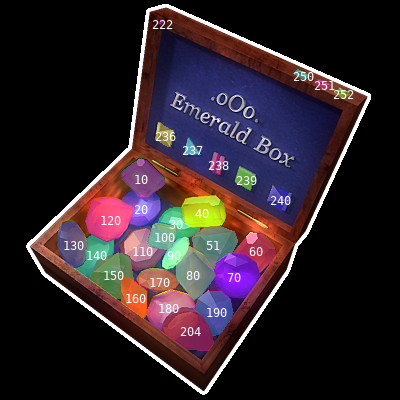
Final verification: every non-zero region of hitmap.png is painted back
onto box_base.png with one colour per shade, shifted by the runtime
offset (+4, -14) worked out in §6.3. The shade index is printed at each
region’s centroid. The 20 gem shades fall on their visible gems
(including shade 160 for Space Potatoes, just south of shade 150),
the five transport buttons line up with shades 236..240, the three
corner glows are 250..252, and the 5×5 hidden-track region (shade
222) sits in the .oOo. motif above the lid title.
3.6 The hidden track
Shade 222 occupies a single 5×5-pixel region at (154..158, 34..38) –
the centre of the decorative “.oOo.” motif above the lid title. The
.txt file shipped with the original demo hints at “hidden part(s)”, and
b133.png contains the 21st track label.
Attempts to trigger this region in the live executable via keyboard
shortcuts (F1/F2/H/x/Return/etc.) and alternate click coordinates were
captured in ref/key_*.png and ref/hidden_*.png but did not isolate
the original’s exact reveal path. In the web port the only way to reach
the hidden track is to click the 5×5 hitmap shade 222 – no keyboard
shortcut, in keeping with the original’s “find it yourself” spirit.
The track module itself was not in the -rip output. The rip tool only
emits the 20 playlist entries and skips the hidden part. To recover it I
looked at the non-bitmap PE resources (rsrc/bin107.bin, 346 KiB, very
high entropy) and noticed the strikingly repetitive byte 0xB5:
$ xxd rsrc/bin107.bin | head -4
00000000: e7d4 c794 afb2 b57a 25c6 b5b5 b8b5 b5b5  .......z%.......
00000010: b5b5 b5b5 3697 c1f5 359c b503 95b5 b5e2  ....6...5.......
00000020: eab5 b5b5 1eb4 6290 5039 1f85 a186 bcb5  ......b.P9......
Under a single-byte XOR, a frequent plaintext byte would map to a frequent
ciphertext byte. Tracker modules and their RAR containers have many zero
bytes; 0x00 ^ 0xB5 == 0xB5. Testing XOR 0xB5:
data = open('rsrc/bin107.bin', 'rb').read()
open('/tmp/ebox.rar', 'wb').write(bytes(b ^ 0xB5 for b in data))
# first 16 bytes of the result: 52 61 72 21 1A 07 00 CF 90 73 00 00 0D 00 00 00
# i.e. "Rar!\x1a\x07\x00..." -- RAR 2.x archive magic.
So bin107.bin is a RAR 2.x archive XORed with 0xB5. The archive
contains 21 entries (method 0x33, normal LZSS), one of which is
hiddenpart_enigma.it (66 568 bytes decompressed, IT module titled
“Enigma”). Extracting it is a one-liner with unrar:
$ unrar x /tmp/ebox.rar hiddenpart_enigma.it
That file now lives at web/tracks/hiddenpart_enigma.it and is wired to
track 21 in assets/playlist.json, so clicking shade 222 (or typing
enigma) actually plays it.
3.7 Artefacts not used
rsrc/bin103.bin(5.7 KiB) – scanline polygon table, probably an alternate gem-outline representation. Redundant given we have the hitmap andsprites.json.
4. Layout metadata
All per-frame runtime knowledge about the chest is consolidated into four
JSON files under assets/:
hitmap_to_track.json– 19 entries, shade → track number.sprites.json– per-gem sprite source, position and size.buttons.json– per-button role, sprite/mask pair, position, and hitmap bounding box.playlist.json– 21 tracks, each with{n, title, file, blurb, label, hitmap_idx?, gem?}.n === 16has nohitmap_idx;n === 21has no gem.layout.json– a derived view over the above, structured by kind (gems, buttons, specials) and including hitmap bounding boxes.
5. Web implementation
5.1 Architecture
The web port is intentionally tiny: vanilla HTML + CSS + JS, no bundler, no transpiler. Four hand-written scripts of 106 / 262 / 388 / 170 lines each, plus one CSS file and one HTML file, total ≈1 019 lines.
$ wc -l web/src/*.js web/style.css web/index.html
  106 web/src/main.js
  262 web/src/player.js
  388 web/src/renderer.js
  170 web/src/ui.js
   59 web/style.css
   34 web/index.html
The only binary dependency at runtime is a prebuilt libopenmpt
WebAssembly module (129 KiB JS loader + 1.2 MiB .wasm).
Everything visible is drawn into a single 400×400 <canvas> element at
the original native resolution, and displayed at exactly 1:1 (400 CSS
px, no upscaling). The window therefore looks small on a modern HiDPI
monitor – identical in apparent size to the native Wine window – and
every on-screen pixel maps one-to-one to a canvas pixel. image-rendering:
pixelated is kept as a belt-and-braces guarantee in case a browser ever
decides to anti-alias the logical→device-pixel mapping:
#stage {
width: 400px;
height: 400px;
image-rendering: pixelated;
image-rendering: crisp-edges;
}
Responsibilities are split across four tiny classes, each in its own file and loaded as a classic script (no ES module step required):
| file | class | role |
|---|---|---|
player.js |
Player |
libopenmpt + WebAudio wrapper |
renderer.js |
Renderer |
canvas compositor, hit-test, debug overlay |
ui.js |
UI |
input → commands |
main.js |
– | bootstrap (fetch metadata, load images, wire up) |
5.2 libopenmpt integration
libopenmpt.js / libopenmpt.wasm come from the official
lib.openmpt.org 0.8.6 release build
and are copied verbatim into web/vendor/. The locateFile hook points
the loader at the correct .wasm path:
<script>
  window.libopenmpt = { locateFile: (p) => 'vendor/' + p };
</script>
<script src="vendor/libopenmpt.js"></script>
Audio is driven by a ScriptProcessorNode. It is officially deprecated,
but still ships in every evergreen browser and is trivial to reason
about – which matters more for a zero-maintenance one-off than the
AudioWorklet ergonomics would. An AnalyserNode is tapped off the
post-gain signal and feeds the oscilloscope overlay:
ScriptProcessorNode → Gain → Analyser → destination
                                └────── getPCM() → renderer scope
Per buffer, _fillBuffers calls directly into wasm:
const count = libopenmpt._openmpt_module_read_float_stereo(
  this._module, this.sampleRate, this.bufferSize,
  this._leftPtr, this._rightPtr,
);
See §6.1 for the reason the code reaches into wasm directly rather than
using the more canonical ccall/cwrap helpers.
5.3 Renderer – layered canvas compositor
Each frame composites seven layers:
box_base.png– the full chest with every gem in its “off” state.- Selected gem highlight –
gem_NN.pngat the position inlayout.playlist[i].gem.xy, painted withglobalCompositeOperation = 'lighten'(see §6.4). - Hovered-but-not-selected gem preview at
globalAlpha = 0.55, also vialighten. - The masked, pre-rendered track label at
(149, 81). Labels are pre-masked once at startup (§6.2). - Transport button highlight while the cursor is over or pressed on one of the five buttons.
- Optional debug overlay (exposed internally, toggled via the
?e2e=1URL-parameter self-test or by settingrenderer.debug = truein devtools): colour-coded hitmap regions, bounding boxes, live cursor coordinates, and the hit-test decision. There is no keyboard toggle.
Lookup tables are built once in the constructor so hitTest(x, y) is a
single ImageData indexing operation:
hitTest(x, y) {
  const i = (y * this.W + x) * 4;
  const r = this._hitmapData.data[i];
  if (r === 0 || r !== this._hitmapData.data[i+1]) return { kind: 'none' };
  if (r in this.shadeToTrack) return { kind: 'gem', shade: r, track: this.shadeToTrack[r] };
  if (r in this.shadeToRole)  return { kind: 'button', shade: r, role: this.shadeToRole[r] };
  if (r === this.hiddenShade) return { kind: 'hidden', shade: r };
  return { kind: 'other', shade: r };
}
The hitmap is pre-shifted by (+4, -14) pixels when snapshotting so the
regions align with the visible artwork (§6.3). The shift is stored as
renderer.hitmapShift for easy tuning.
5.4 UI – input and state machine
The UI class only turns pointer events into commands; there is no
keyboard handling at all, matching the mouse-driven behaviour of the
original exe. Coordinate mapping from DOM pointer events to canvas space
accounts for any residual CSS scaling (in the default 1:1 layout it is
a no-op):
_xy(e) {
  const rect = this.canvas.getBoundingClientRect();
  return {
    x: (e.clientX - rect.left) * (this.canvas.width  / rect.width),
    y: (e.clientY - rect.top ) * (this.canvas.height / rect.height),
  };
}
Dispatch is purely driven by renderer.hitTest(...). No per-element
geometry lives in the UI layer.
5.5 Headless self-test
main.js exposes a query-string hook ?e2e=1 that:
- Turns on the debug overlay.
- Pre-selects track 1 and calls
player.load(...)with no user gesture (so the loader has to be robust to missingAudioContext). - Sets
document.titletoE2E-OKon success orE2E-FAIL: <err>on failure.
That lets a headless Chrome run be asserted against in CI or via a one-liner:
$ chrome --headless=new --virtual-time-budget=15000 \
         --dump-dom 'http://localhost:8080/?e2e=1' \
  | grep -oE '<title[^>]*>[^<]*</title>'
<title>E2E-OK</title>
That one line was the quickest way to prove the §6.1 fix actually worked.
6. Bugs encountered and their fixes
Four distinct bugs showed up during live testing, each with a diagnosis and a minimal fix.
6.1 TypeError: Cannot read properties of undefined (reading 'set')
The first runtime break was:
ui.js:119 load failed: vn-sface.mod TypeError:
  Cannot read properties of undefined (reading 'set')
    at Player.load (player.js:112:23)
Line 112 read libopenmpt.HEAPU8.set(buf, ptr). Inspecting the prebuilt
libopenmpt.js from the official release tarball shows that only the raw
C entrypoints are exported on the Module object:
$ grep -oE 'Module\["(HEAP|wasmMemory|ccall|cwrap|UTF8ToString)[A-Za-z0-9_]*"\]' \
       web/vendor/libopenmpt.js | sort -u
# (empty)
$ grep -oE 'Module\["calledRun"\]|Module\["onRuntimeInitialized"\]' \
       web/vendor/libopenmpt.js | sort -u
Module["calledRun"]
Module["onRuntimeInitialized"]
HEAPU8, HEAPF32, UTF8ToString, stringToUTF8, ccall, and cwrap
are not in the export set. However the upstream loader is not
wrapped in an IIFE – it begins with a bare var Module = ...; – which
means top-level vars land on window when loaded as a classic script.
The fix was to talk to wasm directly:
// before
const ptr = libopenmpt._malloc(buf.byteLength);
libopenmpt.HEAPU8.set(buf, ptr);
const modHandle = libopenmpt.ccall(
  'openmpt_module_create_from_memory2', 'number',
  ['number', 'number', ...], [ptr, buf.byteLength, 0, ...]);

// after
const ptr = libopenmpt._malloc(buf.byteLength);
window.HEAPU8.set(buf, ptr);
const modHandle = libopenmpt._openmpt_module_create_from_memory2(
  ptr, buf.byteLength, 0, 0, 0, 0, 0, 0, 0,
);
Similar treatment for the other calls. String I/O (openmpt_module_get_metadata
takes a UTF-8 key, returns a heap-allocated string pointer) was replaced with
a pair of small helpers _writeCString / _readCString that prefer
window.UTF8ToString / window.stringToUTF8 when present and fall back to
TextDecoder / TextEncoder otherwise. The heap views are re-acquired on
every audio callback:
const heapF32   = window.HEAPF32;
const leftView  = new Float32Array(heapF32.buffer, this._leftPtr,  count);
const rightView = new Float32Array(heapF32.buffer, this._rightPtr, count);
That guards against the underlying wasmMemory being grown between calls.
The init promise was also tightened so it no longer resolves before
window.HEAPU8 is actually defined – i.e. exactly this regression cannot
reappear silently:
const heapReady = typeof window.HEAPU8 !== 'undefined' &&
                  typeof window.HEAPF32 !== 'undefined';
if (m && typeof m._openmpt_module_create_from_memory2 === 'function' && heapReady) {
  resolve();
}
Verified end-to-end with ?e2e=1 (§5.5) → E2E-OK.
6.2 Label blit painted black rectangle over the lid
After selecting a track, the entire 180×107 rectangle of the label was painted over the lid, including black margins outside the trapezoid, visibly destroying the surrounding artwork.
The mask is present and correct (label_mask.png, a pure 1-bit image). The
v1 code composited it with destination-in:
cx.drawImage(src, 0, 0);                           // blue + text + black bg
cx.globalCompositeOperation = 'destination-in';
cx.drawImage(mask, 0, 0);                          // "keep where mask opaque"
The bug: destination-in consults the source alpha, not the source
luminance. Re-inspecting the mask after PNG decoding:
$ python3 -c "
from PIL import Image
m = Image.open('assets/label_mask.png').convert('RGBA')
print('(0,0)   =', m.getpixel((0, 0)))
print('(60,50) =', m.getpixel((60, 50)))
"
(0,0)   = (0, 0, 0, 255)
(60,50) = (255, 255, 255, 255)
Both black and white pixels have alpha = 255, so destination-in
preserved the full destination – the mask was effectively a no-op.
Fix: build a real alpha mask once at startup by walking the mask’s pixels
and setting alpha = (RGB != 0) ? 255 : 0:
_mkAlphaMask(img) {
  const c = document.createElement('canvas');
  c.width = img.naturalWidth; c.height = img.naturalHeight;
  const cx = c.getContext('2d');
  cx.drawImage(img, 0, 0);
  const data = cx.getImageData(0, 0, c.width, c.height);
  const d = data.data;
  for (let i = 0; i < d.length; i += 4) {
    const v = d[i] | d[i+1] | d[i+2];
    d[i+3] = v ? 255 : 0;
  }
  cx.putImageData(data, 0, 0);
  return c;
}
That canvas is then used as the source of destination-in when
pre-composing each label_NN once at startup. The render loop just blits
the pre-masked canvas at (149, 81).
6.3 Hitboxes ~14 px below the visible buttons
The debug overlay (§5.3) showed every hitmap region consistently shifted downward relative to the artwork:
Diagnostic measurements (rough centroid of visible glyph vs. centroid of hitmap region bbox):
button   visible      hitmap        delta
prev   (164, 135)  (160, 148)   (-4, +13)
play   (190, 148)  (188, 160)   (-2, +12)
pause  (213, 164)  (213, 177)   ( 0, +13)
stop   (241, 180)  (241, 192)   ( 0, +12)
next   (275, 200)  (275, 212)   ( 0, +12)
That is, the hitmap is ~4 px left and ~13 px down from the visible button
glyphs in box_base.png. This is most likely a translation the original
app applies before sampling the hitmap (no reverse-engineering of .text
was done to confirm); the two bitmaps by themselves are uncorrelated in
position.
User-provided ground truth for the prev button – a hand-traced
parallelogram (155, 123) → (174, 147) – was used to fix the shift:
visible bbox  (155, 123) – (174, 147)
hitmap bbox   (151, 137) – (169, 160)
translate hitmap by (+4, -14)
resulting bbox (155, 123) – (173, 146)   # differs by 1 px on trailing edge
The fix is a two-line change in renderer.js: translate the hitmap once
when snapshotting it into ImageData, leaving hitTest, the debug
overlay, and the per-shade bbox cache all automatically aligned:
this.hitmapShift = { x: 4, y: -14 };
this._hitmapData = this._snapshotHitmap(assets.hitmap, this.hitmapShift);

_snapshotHitmap(img, shift) {
  const c = document.createElement('canvas');
  c.width = img.naturalWidth; c.height = img.naturalHeight;
  const cx = c.getContext('2d');
  cx.drawImage(img, shift ? shift.x : 0, shift ? shift.y : 0);
  return cx.getImageData(0, 0, c.width, c.height);
}
6.4 Grey rectangle around highlighted gems
Some highlighted gems (notably 08 and 18) showed a rectangular halo around the gem shape when selected; others (10, 12, 15) did not.
Inspection of the sprites shows they are plain RGB bitmaps with no alpha
and no separate mask resource (gem resources b134..b153 are RGB; the
only 1-bit bitmaps in that range are transport-button masks).
An interesting observation made the fix trivial: every pixel of every gem
highlight is brighter or equal to the corresponding pixel of
box_base.png. Verified for gem 8:
$ python3 -c "
import numpy as np; from PIL import Image
import json; layout = json.load(open('assets/layout.json'))
base = np.array(Image.open('assets/box_base.png').convert('RGB'))
item = next(g for g in json.load(open('assets/playlist.json')) if g['n'] == 8)
x, y = item['gem']['xy']; w, h = item['gem']['wh']
gem  = np.array(Image.open('assets/gem_08.png').convert('RGB'))
patch = base[y:y+h, x:x+w]
print('gem_pixels >= base_pixels everywhere:',
      (gem.astype(int) - patch.astype(int) >= 0).all())
"
gem_pixels >= base_pixels everywhere: True
That strongly suggests the native app composites the highlight sprite using
per-channel max(base, src) – the lighten blend mode. Under that
operation, pixels inside the visible gem shape (which are strictly
brighter in the sprite) become the sprite value, and pixels outside the
gem shape (which equal the base in the sprite) remain unchanged – exactly
the behaviour we want, no mask required.
Fix is one line in the draw path:
ctx.globalCompositeOperation = 'lighten';
ctx.drawImage(this.assets[`gem_${String(track).padStart(2,'0')}`],
              g.xy[0], g.xy[1]);
// (later) ctx.globalCompositeOperation = 'source-over';
Hover-preview still works under lighten because the formula
max(base, src·α + base·(1-α)) still respects globalAlpha, giving a
natural fade-in when moving the cursor across a new gem.
7. Repository layout
Top-level:
ebox/
├── emerald_box.exe            # original, UPX-packed
├── emerald_box.unpacked.exe   # upx -d output
├── tracks/                    # 20 tracker modules (.it, .mod)
├── ref/                       # screenshots + video captured under Wine
├── rsrc/
│   ├── raw/                   # wrestool output, *.dib
│   └── png/                   # converted *.png (58 bitmaps)
├── assets/                    # semantically-named final artwork + metadata
│   ├── box_base.png           # base image (b102)
│   ├── hitmap.png             # grayscale hit-index map (b111)
│   ├── label_mask.png         # 1-bit trapezoid mask (b132)
│   ├── label_01..20.png       # pre-rendered track titles (b112..b131)
│   ├── label_hidden.png       # hidden track label (b133)
│   ├── gem_01..20.png         # highlight sprites (b134..b153)
│   ├── btn_{prev,play,pause,stop,next}{,_mask}.png
│   ├── decor_{glow,corner_a,corner_b,corner_c}.png
│   ├── {hitmap_to_track,sprites,buttons,layout,playlist}.json
│   └── MANIFEST.md            # provenance of every file in this folder
└── web/
    ├── index.html
    ├── style.css
    ├── README.md
    ├── src/
    │   ├── main.js            # bootstrap
    │   ├── player.js          # libopenmpt + WebAudio
    │   ├── renderer.js        # canvas compositor + hit-test + debug overlay
    │   └── ui.js              # input handling, transport, easter-egg
    ├── assets/ -> ../assets
    ├── tracks/ -> ../tracks
    └── vendor/
        ├── libopenmpt.js          # 129 KiB, Emscripten loader
        ├── libopenmpt.wasm        # 1.2 MiB, compiled libopenmpt 0.8.6
        └── libopenmpt-license.txt # BSD-3-Clause
To run:
$ cd web && python3 -m http.server 8080
$ xdg-open http://localhost:8080/